In this lesson
- fill in a limit, market and stop-limit order step by step
- understand how the Price, Amount and Total fields relate
- avoid the mistakes that cost beginners the most
- try the orders and the most expensive mistakes on a practice panel
You will find the theory of orders in the lesson Order types in depth. Here is the practice: the order panel has only a few fields, but one extra zero or mixing up two buttons can cost you a lot. So Professor Wick advises: slowly, and look twice before you click.
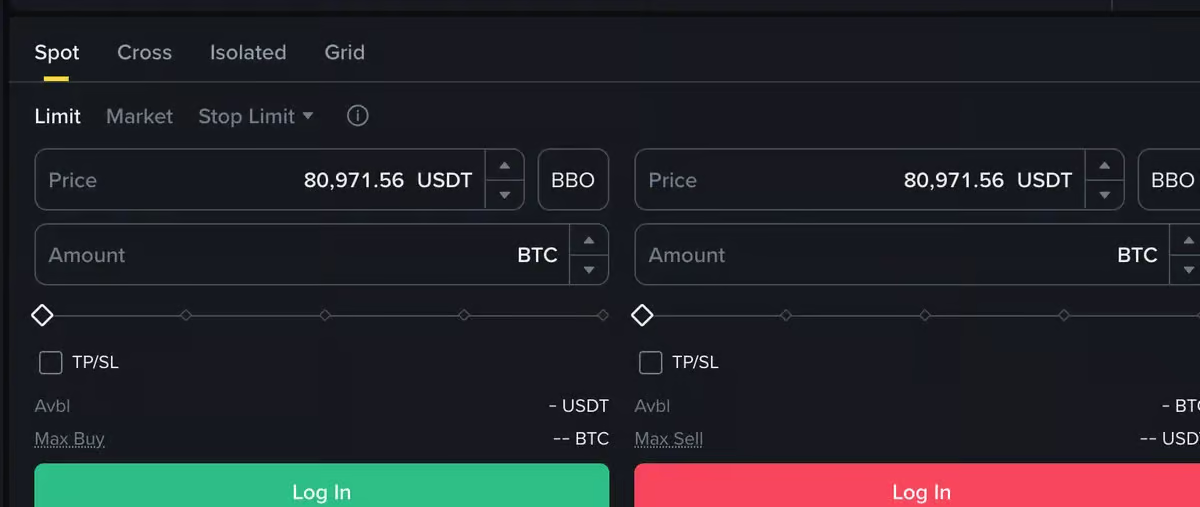
A limit order: "I will buy when it is at that price"#
Bitcoin costs 60,000 euros and you want to buy when it drops to 58,000.
- The Spot tab, the Buy button, the Limit type.
- Price: 58,000 – the highest price you are willing to pay.
- Amount: 0.002 BTC – or fill in Total: 116 EUR. The fields are linked: price × amount = total.
- Check the summary and confirm.
The order appears in open orders and waits. If the price never reaches 58,000, it never executes. If you no longer want it, cancel it.
A market order: "I will buy now, at whatever it goes for"#
The Market type has no price field. You enter only an amount or a sum and buy immediately at the best offers in the order book. It is fast, but you do not know the exact price in advance – especially with thinly traded pairs and large amounts, slippage can cost you.
Stop-limit: "sell if it is falling"#
You bought bitcoin at 60,000 and want to sell it if the price falls below 55,000.
- Sell, the Stop-limit type.
- Stop (trigger price): 55,000 – once a trade happens at this price, the order activates.
- Limit: 54,500 – the lowest price you are willing to sell at. Leave some room between the stop and the limit, or the order may not execute in a sharp fall.
- Amount: how much you are selling.
The mistakes that cost the most#
- An extra or a missing zero. 5,800 instead of 58,000 on a sale means selling at a tenth of the price. A limit sell below the current price executes immediately at the best bids.
- Buy instead of Sell. The buttons are side by side and differ only in colour.
- The slider at 100%. One drag bets your whole balance.
- Futures instead of Spot. See lesson 13.
The preview before confirming
Most exchanges show a summary before sending: price, amount, total and fee. Read it. It is the last moment a mistake can be fixed for free.
Try it yourself#
The practice panel below is a simulation: no exchange, no real money. The order book is deliberately thin near the price, so you can see what a big market order does. Try:
- A limit buy at 58,000. Where does the order go, and what happens to your balance?
- A sale at 5,800 instead of 58,000. What does the preview tell you before you confirm?
- A market buy of 0.03 BTC. How many price levels of the book does it go through, and what is the slippage?
- A stop-limit sale with both the stop and the limit at 55,000. Why does the simulator warn you?
Common myths#
- "A limit buy above the current price will wait." It does not execute at your higher price but immediately at the best offers in the book – which can still cost you more than you intended.
- "A stop-limit always protects me." In a sharp fall through your limit, the sale does not execute.
- "A market order is the cheapest because it is instant." You pay a higher fee and possibly slippage.
Summary
- Limit: you enter price and amount; the order waits in open orders.
- Market: you enter only the amount; it executes now at the best offers – with slippage.
- Stop-limit: a trigger price plus a limit with room for a sharp move.
- Read the summary before confirming – an extra zero or mixing up Buy/Sell is the most expensive mistake.